%20-%20120%20x%2044.svg)
We’ve introduced BizzyAI: Insights, a new AI‑powered assistant that works directly from the client profile to help you:
- Generate detailed letters and emails for referrers, clients, and third parties
- Ask questions about a client and get answers grounded in their actual record
- Quickly create summaries of a client’s history
BizzyAI: Insights securely queries your Zanda data (client profile, appointments, notes, forms, invoices, etc.), then passes that information to our AI model to draft content that’s tailored to your request.
BizzyAI: Insights is currently in Beta and isn't available in all accounts.
If you are interested in joining the beta program, please register your interest here.
In this article:
- What You Can Do with BizzyAI: Insights
- Conversational Context in the Insights Modal
- Safety & Guardrails
- Getting Started
- Can't see BizzyAI: Insights?
- Tips for Best Results
- Security & Privacy
- FAQs
What You Can Do with BizzyAI: Insights
From a client’s profile, you can now:
- Draft referrer progress letters
e.g. “Write a progress letter including appointments, diagnoses and clinical notes since the referral start date.” - Create client‑friendly summaries
e.g. “Summarise this client’s progress over the last 6 sessions in clear, non‑technical language.” - Prepare emails that combine multiple data types
e.g. “Generate an email for the client that combines their appointment schedule and any pending forms.” - Produce mixed‑context updates
e.g. “Create an update letter for the referrer including all completed notes, diagnoses, and appointment attendance.”
Insights supports mixed context queries, meaning a single request can draw from multiple areas such as appointments, notes, forms, diagnoses, referrals, invoices and more.
Conversational Context in the Insights Modal
BizzyAI: Insights remembers the conversation context while the Insights modal is open:
- You can ask follow‑up questions without restating everything.
- Example:
- First: “Write a progress letter to the GP based on notes and appointments from the last 6 months.”
- Then: “Shorten that letter to one page and make it easier for a non‑clinical reader.”
- Example:
- Insights keeps track of:
- The client you’re working with
- Earlier questions and answers in this session
- The data it has already considered for this draft
Closing the Insights panel doesn't wipe the conversation—reopen it on the same page and your earlier questions and answers are still there. To start fresh, click the bin icon on the last reply (its tooltip reads "Clear conversation context for the next response"). Moving to a different page or refreshing also starts a new conversation.
If you ask Insights to draft a letter or email, it offers to move you to BizzyAI: Write - click Continue to Write with Insights on that prompt to carry the conversation across and keep working there.
Safety & Guardrails
BizzyAI: Insights has explicit guardrails:
- It must not provide medical advice.
- It only comments on what is observed in the client’s record, including observations or advice that practitioners have already recorded.
- It does not:
- Create new diagnoses
- Suggest treatment plans or medication changes
- Edit or delete any of your data
You always remain in control: review and adjust every draft before saving or sending.
Getting Started
- Open a client's profile in Zanda
- In the left-hand menu of the client's profile, scroll to the bottom and click BizzyAI Insights. It sits below the other menu items, under a dividing line, and appears on every page of the client's profile, including Notes.

- In the Insights panel:
- Type a question or request in plain language (or use a pre-defined question section).
- Optionally specify a time frame (e.g. “since 1 January” or “last 6 sessions”).
- Click to generate.
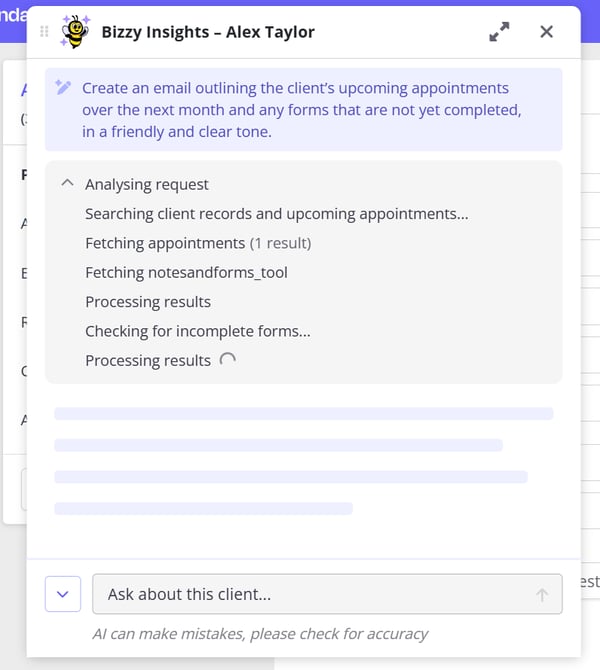
- Alternatively select one of our pre-defined prompts from under the chevron menu to the left of the prompt input box
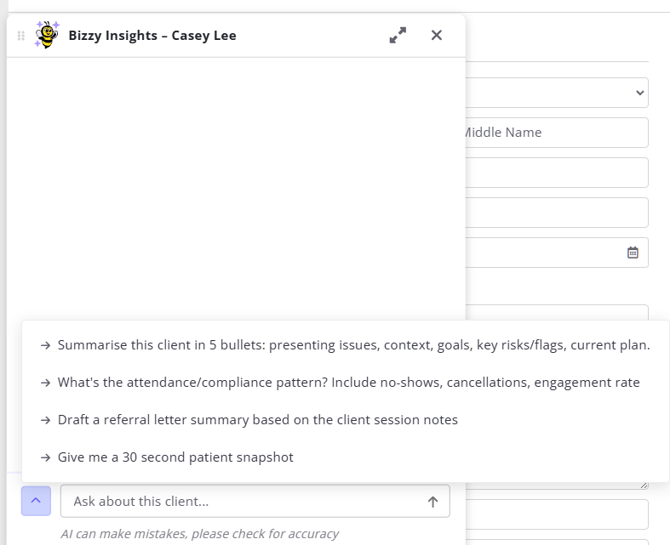
- Review the drafted text, edit as needed, then copy, save, or send via your usual workflow.
Can't see BizzyAI: Insights?
BizzyAI: Insights is currently in Beta and isn't available in all accounts.
If you are interested in joining the beta program, please register your interest here.
If you are in a client's profile and the BizzyAI Insights button isn't where you expect it, what you're seeing tells you what to do next.
The button isn't there at all
Insights hasn't been switched on for your account yet. Nothing you change in the client's profile will make it appear—it's turned on at the account level. Ask a colleague with setup permissions to check Account Settings > Subscription > Optional Add-Ons, or register your interest here.
The button is there but grayed out
Insights isn't switched on for you yet. Hover over the button and the tooltip tells you what's needed - it reads "not enabled for your account":
- If you have setup permissions, go to Account Settings > Subscription > Optional Add-Ons and switch Insights on for yourself.
- If you don't, ask your account manager or whoever handles your subscription to do it for you.
- If the tooltip mentions Storage Mode, Insights isn't available while an account is in Storage Mode.
If your account is still on the free beta, this screen shows BizzyAI: Insights (Free Beta) with a link to request access.
One more thing to check: Insights only shows a client's information that you can already see yourself. If your own access to a client's notes is restricted, Insights won't include those notes in anything it drafts.
Tips for Best Results
- Be specific in your prompt
Include date ranges, audiences, and focus areas, e.g.:- “since 1 January”
- “for the client’s GP”
- “focusing on anxiety‑related sessions only”
- State the tone
Ask for “professional and formal”, “supportive and clear for a layperson”, or “brief bullet‑point summary”. - Mention the data you care about
For example:- “Based on appointments, diagnoses, and clinical notes…”
- “Combining attendance, invoices, and tasks…”
Double‑check for accuracy
Ensure the draft aligns with the client file and meets your local professional and legal requirements.
Security & Privacy
Zanda adheres to strict privacy standards, and the services used for querying and generating content meet rigorous industry standards for security and compliance.
About the services we use
AI Content Generation:
- We use the AWS Bedrock service to access an industry-leading large language model (LLM) for generating letters, emails, summaries, and answers based on your client data.
- We have configured AWS Bedrock to use Anthropic's Claude for processing and generating content.
- Data is encrypted in transit and at rest.
- No data is used to train the AI model. All information is processed securely in real time.
- Zanda has a zero retention agreement with AWS to ensure that no data is stored after processing.
FAQs
Who can access BizzyAI Insights?
BizzyAI Insights is only accessible to users in accounts where both "Enable AI Features" and "Enable Insights" are turned on. Within those accounts, Insights only surfaces data that the acting user already has permission to view in the client profile. If a user cannot see a client's notes, for example, Insights will not include that data in any response.
What client data does BizzyAI Insights access?
Insights can draw on information already visible to you in the client profile. It does not access any data outside of what is available to you in the client profile. For a full breakdown, see the What BizzyAI Insights Can Use From the Client File section above.
Is client data sent to a third-party AI provider?
Only the specific fields required to respond to your prompt are sent to the AI model. These fields correspond to what you can already see in the client profile. This data is handled in line with Zanda's privacy, security, and data protection standards. Zanda has a zero retention agreement with AWS, meaning no data is retained after processing.
Will my data be used to train the AI model?
No. AWS does not use any input or output data to train its own or any third-party model.
Can BizzyAI Insights change or delete any records?
No. Insights is read-only. It can read data, summarise it, and draft content for your review. It cannot edit or delete notes, appointments, invoices, tasks, or any other records.
Can I ask BizzyAI Insights to review the charges on a client's last invoice?
Yes. From the client profile, open BizzyAI: Insights and ask about the client's last or most recent invoice. Insights can use the client's invoice and payment history to return invoice details such as the invoice number, invoice date, charges, payments, owing amount, payment method, practitioner, location, insurers, and linked services.
Where is my data processed?
We use regional AWS servers for the Bedrock service depending on your location. Your data remains protected under applicable privacy laws.
Does BizzyAI Insights comply with data protection laws?
Yes. BizzyAI Insights is compliant with GDPR, HIPAA, APA, and other applicable regional regulations. This includes:
- HIPAA: Adherence to US HIPAA regulations, safeguarding protected health information (PHI).
- GDPR: Full compliance with EU and UK GDPR, including lawful data processing, data minimisation, and protection of data subject rights.
- Regional laws: Compliance with Australia's Privacy Act, Canada's PIPEDA, South Africa's POPIA, and California's CCPA.
- ISO 27001 Certification: Stringent security measures are in place to protect sensitive information and maintain data integrity.
- Business Associate Addendum (BAA): Zanda has a binding BAA with AWS covering all services used in BizzyAI functionality. The same standardised BAA is available to customers requiring a secure environment for processing, maintaining, and storing PHI.
How do I track changes made using BizzyAI Insights?
Activity in BizzyAI Insights is logged, including when the Insights modal is opened and when prompts are submitted. Logs track the time and the user who performed the action.
Am I responsible for reviewing content generated by BizzyAI Insights?
Yes. While BizzyAI Insights generates drafts based strictly on the data in the client record, you should always review, edit, and approve all generated content before saving it as a note, sending it as a communication, or sharing it externally. The practitioner remains responsible for the accuracy and appropriateness of all documentation.