%20-%20120%20x%2044.svg)
While Zanda does not currently offer a dedicated self check-in kiosk or a client-facing tablet screen where clients tap to check themselves in on arrival, and there is no built-in integration that connects Zanda to a separate physical check-in device, your reception and admin team can still track arrivals quickly, and this article covers the best ways to do that today.
In this article:
- Marking a client as arrived
- Using a tablet at reception
- Connecting your own check-in device
- Related Articles
Marking a client as arrived
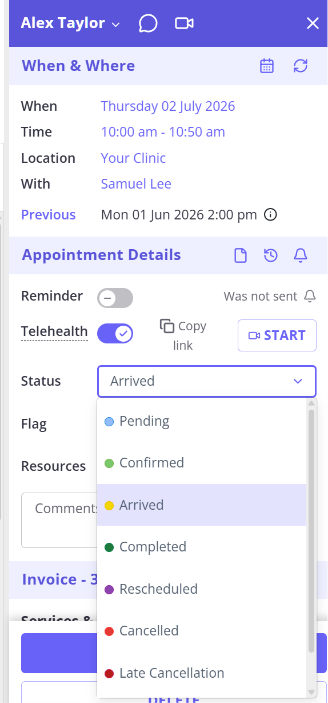
When a client arrives, a reception or admin staff member sets the appointment's status to Arrived from the appointment details. The appointment then shows in yellow on the calendar, so your team can see at a glance who is waiting. Appointment statuses are applied manually by your staff.
For the full list of statuses and their colours, see Appointment Statuses, Symbols and Calendar Legend.
Using a tablet at reception
Zanda runs in a web browser, so you can open it on a tablet at your front desk and update appointment statuses from there. This is the full Zanda app used by your staff, not a locked-down screen for clients to use unattended.
To set this up, see Setting Up Zanda on a Mobile Device or Tablet.
Connecting your own check-in device
If you would like a third-party check-in device to record arrivals in Zanda automatically, note that the Zanda Public API is currently in beta and supports read-only (GET) requests, so it cannot yet write an arrival status back into Zanda. The ability to create and update records through the API is on the way. For the current status, see Zanda API.
If a client-facing self check-in option would help your practice, let us know through the Ideas Portal (via Help > Submit and Idea) so we can factor it into future planning.
Related Articles
- Appointment Statuses, Symbols and Calendar Legend - The full list of appointment statuses, symbols, and calendar colours, including Arrived.
- Setting Up Zanda on a Mobile Device or Tablet - How to open and use Zanda in a browser on a mobile device or tablet.
- Zanda API - The current status of the Zanda Public API, including which request types are supported.