%20-%20120%20x%2044.svg)
In this article:
- Who Is Able To Remove SMS Message Content?
- Steps to Remove the SMS Message Content
- Frequently asked questions
Who Is Able To Remove SMS Message Content?
- A Master User or a user with the permission to Setup and Configure Zanda are able to remove the content of such client replies.
- User permissions can be updated via User Menu > Account Settings > Team > Users.
Steps to Remove the SMS Message Content
- To remove the client message content, navigate to Client Profile > Communication > Activity.
- Locate the Received message and open it to view
- Click on the Remove Content button under the message
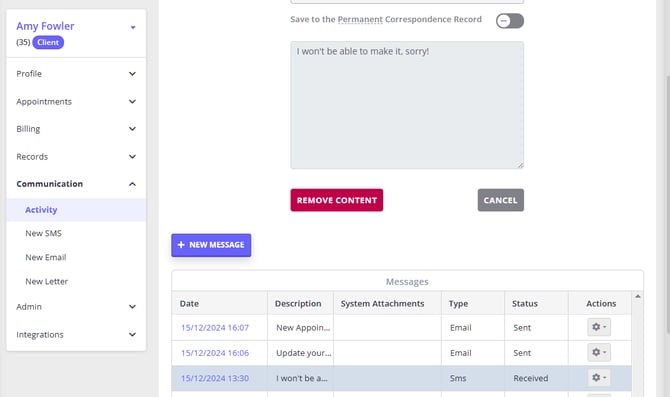
-
If you are sure you want to remove this message content, click Save
-
The message will be removed, and the record of who and when removed it will be saved

Note: To update the Messaging Panel record, you will need to re-log in to your Zanda account after the message content was removed.
Frequently asked questions
❓ Can I remove or recall a sent SMS?
If a sent message contained an error or information you need to correct, send a follow-up SMS to the client with the correct details—once an SMS has been sent from your account, it cannot be recalled, unsent, or deleted, because the message has already been delivered to the client's phone. The Remove Content option described above is available only for Received client replies; it will not appear on messages your practice has sent. All sent and received messages remain visible in Client Profile > Communication > Activity for your records.