%20-%20120%20x%2044.svg)
The "Refer a Friend" program is designed to reward you for recommending Zanda to other professionals. When you invite a friend to join Zanda, you'll both receive benefits if they sign-up for a paid account.
In this article:
- Eligibility requirements
- Understanding the rewards
- How to access your referral link
- Sharing your link
- Frequently Asked Questions
- Related Articles
To participate in the Refer a Friend program and access the referral tools, your account must meet the following criteria:
- Account Status: You must be a paying customer (users on a Free Trial are not eligible).
- Tenure: You must be a paying customer for 3 consecutive months.
💡 Note: If you do not meet these criteria, the referral options will not be visible or accessible in your account.
All users of an eligible account are able to participate in the referral program and will be able to generate their personal referral link.
The program rewards both you and the person you refer.
- The Referrer: You will receive a $100/£75 Amazon Gift Card.
- The Referee: Your friend will receive $100/£75 Zanda Account Credit.
Note: The specific rewards amount will be shown in your Refer a Friend module.
You can access the referral program directly from your Zanda account.
- Log in to your Zanda account.
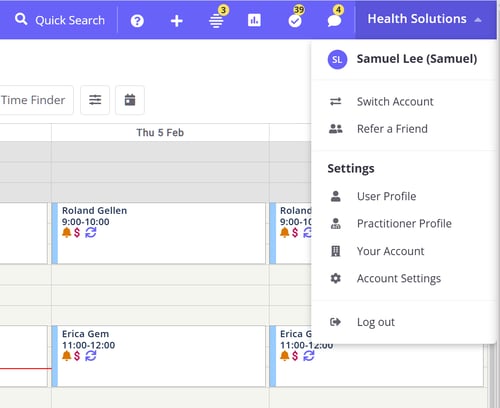
- Navigate to the Refer a Friend modal in the user menu.
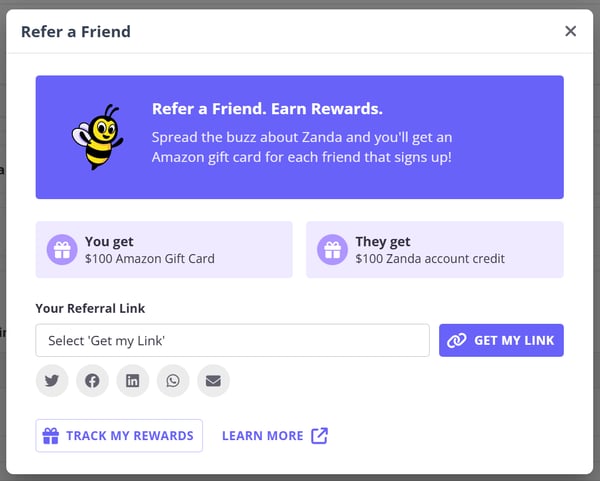
- Click Get my link.
- If you have generated a link previously, it will be retrieved for you.
- If this is your first time, a new unique referral link will be created.
- You will receive a confirmation email from the First Promoter platform asking you to generate a password for your First Promoter account dashboard, where you will be able to track your referrals and rewards. Your Zanda user email will be used to create your First Promoter account.
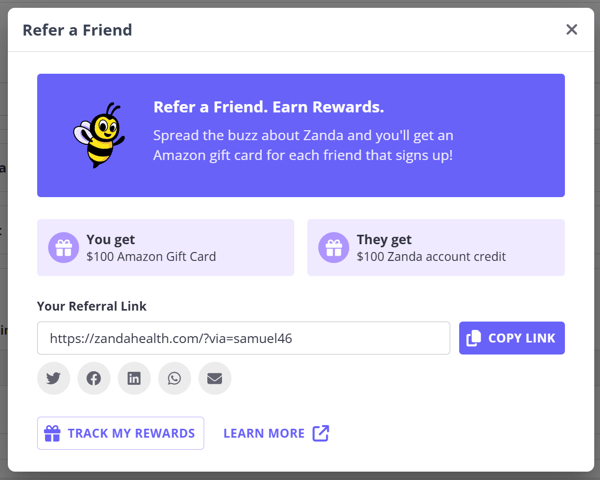
Once you have your unique link, you can share it with your network using the integrated tools:
- Direct Copy: Click to copy the link to your clipboard and paste it anywhere.
- Social Sharing: Use the built-in buttons to share directly to:
- Twitter (X)
- Direct Message: Use the WhatsApp or Email buttons. The email option will open your default mail client with a pre-filled subject and body to make sharing easy.
❓ Why can't I see the Refer a Friend option?
Access to the program is restricted to paying accounts that are at least 3 consecutive months old. If you are on a Free Trial or have recently joined, you're not eligible yet. If you have any questions, email us at connect@zandahealth.com.
❓ How is the referral tracked?
We use an external tracking system, First Promoter, which works by using a unique URL for each referrer. When your friend clicks your referral link, their sign-up is attributed to you via website cookies as they visit the site and start a free trial.
❓ How long does the referral link stay active?
Once a friend clicks your link, the tracking cookie remains active for 90 days. This means you will still receive credit for the referral even if they don't sign up immediately.
❓ What if my friend didn’t use my link?
If they signed up without using your link, they have a 60-day window from the start of their free trial to email us at connect@zandahealth.com to let us know. We will manually attribute the referral to your account so both parties are eligible for the reward.
❓ How do I track my referrals?
You can track your progress by logging into your dashboard at zandahealth.firstpromoter.com/login, also available from the 'Track my rewards' button. From there, you’ll have full access to view your referrals, commissions, marketing assets, and performance reports.
❓ Can my friend still receive the 50% introductory discount if they sign up through my referral link?
Yes. When the 50% introductory discount is shown during sign-up, your friend can still receive it after using your referral link. The referral link tracks the referral separately, so the referred practice can receive the Zanda account credit when their first subscription invoice has been successfully paid.
❓ When are the rewards due?
Rewards are issued once the referred practice’s first subscription invoice has been successfully paid.
❓ What if I was already registered for the Refer a Friend program?
If you originally signed up for the program using the same email address as your Zanda account, your referral link will remain the same in-app.
If you used a different email address to register for the Refer a Friend program, you can choose to continue using your existing referral link or generate a new one through the in-app module.
If you experience any issues, please contact the Marketing team at connect@zandahealth.com.
- Account Management - Managing your Zanda account details
- Subscription and Billing - Understanding your subscription