%20-%20120%20x%2044.svg)
Some practices want Zanda for the clinical side only: client profiles, session notes, forms, uploaded files, and communication history, while appointments stay in a separate booking or scheduling product. You can do this, and this article explains how records-only use works day to day.
In this article:
- Using Zanda for client records only
- Adding records without booking an appointment in Zanda
- What works differently when appointments live elsewhere
- Connecting Zanda to another clinical system
- How your plan affects records features
- Frequently Asked Questions
- Related Articles
Using Zanda for client records only
A client record in Zanda belongs to the client, not to an appointment. You can create a client profile and add notes, forms, files, and correspondence to it without booking an appointment in the Zanda calendar, so you can keep using another product for bookings.
You will still create a client profile for each person you document, because every note and form is filed against a client.
Adding records without booking an appointment in Zanda
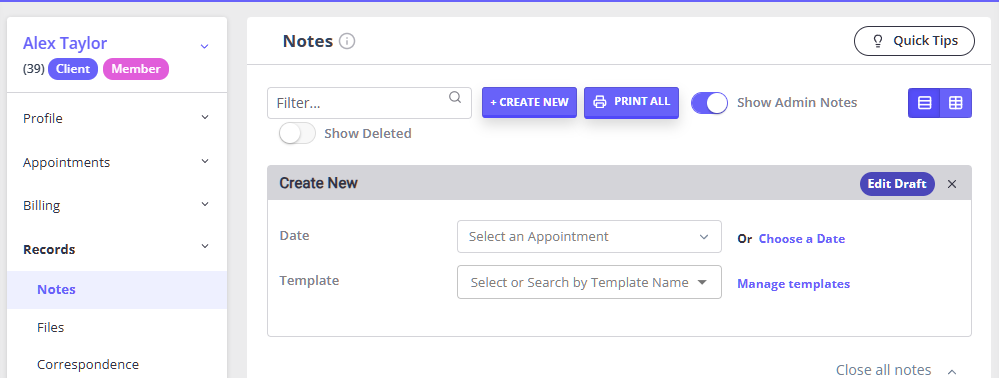
To write a note for a client with no Zanda appointment:
- Open the client's profile.
- Open the Records section in the left-hand menu, then the Notes tab.
- Click the ➕ Note button and choose your note template.
- Write the note and click Save.
Forms, file uploads, correspondence, and diagnoses work the same way — they are all filed under Records on the client profile, and none of them require an appointment.
One thing to know about dates: a note created this way starts out not linked to an appointment, so its Activity Date shows the date and time you started writing rather than a session time. If the session date matters for your documentation, set it as you write, or link the note to an appointment later if you do create one. See Creating and Managing Session Notes for how the Activity Date behaves.
What works differently when appointments live elsewhere
Records-only use is supported. Several Zanda features are driven by the appointment, so they run once a booking exists in the Zanda calendar:
- Appointment reminders (SMS and email) are generated from Zanda appointments.
- Invoicing and payments raised from an appointment, along with session packs and appointment-based claiming, start from a booking in the Zanda calendar. You can still raise invoices manually against the client.
- Appointment-based reporting — attendance, utilization, and appointment counts — reflects what is booked in Zanda.
- Client Portal booking and online bookings are part of the Zanda calendar.
Your two systems stay separate unless you also create the appointments in Zanda.
Connecting Zanda to another clinical system
Zanda does not currently offer a direct integration with third-party electronic health record (EHR) or electronic medical record (EMR) systems. The available integrations cover payments, accounting, marketing, calendar, exercise prescription, and region-specific claiming — you can see the current list in Practice Setup Guide - The Basics.
The Zanda Public API is in beta, and enrolments in the beta testing group are currently closed. You can register interest for the next phase from Help Menu > Beta Program in your Zanda account. See Zanda API for what the beta currently supports.
If you are moving records into Zanda from another system, Zanda support can help with data migration rather than a live connection.
How your plan affects records features
Client records are core practice management, and both the Starter and Growth plans include client profiles, session notes, intake forms, file uploads, and communication history.
What differs between plans is capacity rather than access to the records area — practitioner numbers, users, appointment volume, and locations. For a records-only practice this usually works in your favor: plan eligibility is based on your number of active practitioners and your Zanda appointment volume, so a solo practitioner who is not booking appointments in Zanda is not using up the Starter appointment allowance.
For the current plan comparison, see Understanding Zanda Subscription Plans. For anything specific to your account, contact Zanda support.
Frequently Asked Questions
❓ Can I keep using my current booking software and use Zanda only for client records?
Yes. Notes, forms, and files are filed against the client profile and do not require a Zanda appointment, so you can document in Zanda while bookings stay in another product.
❓ Do I have to create appointments in Zanda to write notes?
No. You can create a note from the client's Records > Notes tab at any time. Creating it from an appointment simply links the two and sets the note's Activity Date to the session time.
❓ Will a records-only account still be eligible for the Starter plan?
Plan eligibility is based on your active practitioner count and your appointment volume in Zanda. A solo practitioner who is not booking appointments in Zanda is not consuming the Starter appointment allowance. Adding a second practitioner moves the account to Growth. Contact Zanda support if you want your account checked.
❓ Does Zanda integrate with my existing EHR or EMR?
Not at this stage. Zanda does not offer a direct integration with third-party clinical record systems, and the Zanda Public API is still in beta with enrolments closed. Data migration into Zanda is supported — contact Zanda support to discuss it.
❓ Can I start with records only and add scheduling later?
Yes. Nothing about records-only use prevents you from booking appointments in Zanda later. Once you do, appointment-driven features such as reminders, appointment invoicing, and attendance reporting begin working, and your notes can be linked to appointments.
Related Articles
- Client Profile in Detail - Where notes, forms, files, correspondence, and diagnoses live on the client profile.
- Creating and Managing Session Notes - Writing notes, linking them to appointments, and how the Activity Date is set.
- Understanding Zanda Subscription Plans - How Starter and Growth compare, and what determines your plan.
- Practice Setup Guide - The Basics - Setup essentials, including the integrations available to your account.
- Zanda API - What the Public API beta currently supports.