%20-%20120%20x%2044.svg)
This article explains in general how the SMS feature works in Zanda, and how fees are charged so that you can better understand the system and your costs.
Important
A dedicated Toll-Free Number (TFN) is required to send/receive SMS messages in the USA, Canada, Puerto Rico, Bahamas, Jamaica, Costa Rica, and Barbados. For more details, please click here.
In this article:
- Standard SMS Credits Costs
- Standard Messages and SMS Credits Explained
- Non-Standard Messages and SMS Credits
- Checking Your Monthly SMS Charges
- Checking the SMS Usage Report
- Frequently Asked Questions
- Related Articles
Standard SMS Credits Costs
Below are the costs per one SMS credit, based on the location of your Zanda account:
- 1 SMS Credit for the USA = $0.09 USD
- 1 SMS Credit for the UK = £0.09 GBP
- 1 SMS Credit for Canada = $0.09 CAD
- 1 SMS Credit for Europe = €0.11 EUR
- 1 SMS Credit for Australia = $0.15 AUD + GST 10%
- 1 SMS Credit for New Zealand = $0.15 NZD
- 1 SMS Credit for South Africa = R1.60 South African Rand
- 1 SMS Credit for Other countries (global) = $0.11 USD
Standard Messages and SMS Credits Explained
- As per international telecommunications standards, the length of a standard text message is 160 characters, including spaces. An SMS message can certainly exceed 160 characters; it will, however, become a ‘multi-part message’ in terms of SMS charges.
Important
This character count applies only to the Global System for Mobile (GSM) character set. GSM includes Latin letters A to Z, numbers 0 to 9, and a few symbols and special characters (such as exclamation marks).
⚠️ Some special characters—including emojis and extended punctuation like long dashes (–)—fall outside of the GSM-7 character set and will cause your message to use multiple SMS credits.
You can view the full GSM-7 character set and learn more here (Twilio).
- As soon as your text becomes a multi-part message, the character limit changes to 153 characters per part. You will get charged per part where one part is one SMS credit. Regardless of how many parts you send, your recipients will only receive one longer message.
- Here is a guideline to follow when composing a standard message or multi-part message:
- 1 – 160 characters = 1 SMS credit
- 161 – 306 characters = 2 SMS credits
- 307 – 459 characters = 3 SMS credits
- And so on…
The text message body limit is 5000 characters, which creates 33 ‘parts’ in a standard GSM message. In other words, 5000 characters / 153 characters = 33 SMS credits.
Hint 💡You can always check how many parts your text message consists of by viewing this counter:
- on the Text Messaging Panel,
-
or in Client Profile → Communication → New SMS,
Appointment reminder templates and SMS credits
Appointment reminder SMS messages use the same SMS credit calculation as other SMS messages in Zanda. If your reminder template includes merge fields, Zanda replaces those fields with the appointment, client, practitioner, or practice details before the SMS is sent. The final merged SMS body is then used to calculate how many SMS credits are required.
This means a short template can still become a multi-part SMS if the merged details make the final message longer than the standard message limits above. To keep reminder costs predictable, review the wording in your SMS reminder templates and allow room for the longest names, locations, or other merged details your practice commonly sends.
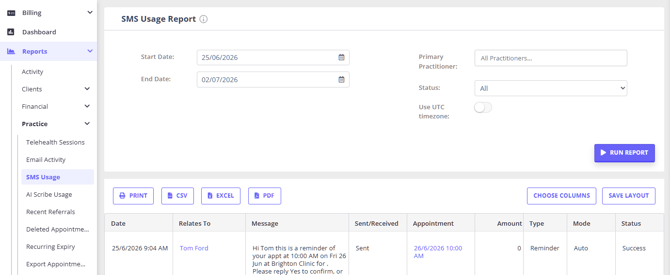
After reminders are sent, you can review the messages in Reports > Practice > SMS Usage. The report shows each SMS message, whether it was automatic, the message type, the send status, and the amount recorded for the message.
Non-Standard Messages and SMS Credits
A non-standard message is a message that contains any characters that are not standard GSM. Its maximum character length will become 70 characters long. Non-standard messages are those that contain Unicode characters and emojis. Once you go beyond those 70 characters, they become segmented into multiple parts. Each part can then be up to 67 characters long.
Here is a guideline to follow when composing a single or multi-part Unicode (non-GSM) message:
- 1 – 70 characters = 1 SMS credit
- 71 – 134 characters = 2 SMS credits
- 135 – 201 characters = 3 SMS credits
- And so on…
The maximum number of characters in a Unicode text message is 5000 characters, which is 75 message parts. In other words, 5000 characters / 67 characters = 75 SMS credits.
Checking Your Monthly SMS Charges
Your monthly bill includes SMS charges for the messages you sent in the previous month. You can find this information in User Menu > Account Settings > Practice > Subscription > Invoices and Receipts
Checking the SMS Usage Reports
To see the specifics of what messages have been sent and received, please refer to the SMS Usage report.
- Navigate to Reports > Practice > SMS Usage;
- Enter the date range in the report filter at the top of this page;
- You can filter the report further by Practitioner and SMS status;
- Hit Run Report;
- Once ready, the report will provide you with the details of each message;
- You will be able to print or export the report to PDF or Excel
Does the SMS Usage Report include GST?
The amounts shown in the price column—and the total at the bottom of that column—are displayed inclusive of GST where your account has a tax rate configured (for example, 10% GST for Australian accounts). If no tax rate applies to your account, the amounts are shown with no tax added.
Frequently Asked Questions
How can I find missing or older text messages?
Use the SMS Usage report first when you need to check whether SMS messages were sent or received during a specific period. The Client Profile > Communication > Activity page is useful for reviewing a client's recent communication history, but it only shows sent and received communication from the last 12 months.
To check a specific date range:
- Go to Reports > Practice > SMS Usage.
- Enter the date range you want to review.
- Filter by Practitioner or SMS status if you need to narrow the results.
- Select Run Report.
- Review the report columns for the message date, client or phone number, message content, whether the message was sent or received, the message type, mode, status, and any linked appointment.
- Print the report, or export it to PDF or Excel if you need to share or keep a copy.
If the SMS Usage report does not show an SMS you expected to see, check the client's Communication > Activity page for the same period if it is within the last 12 months. If neither place shows the message, contact Zanda support with the client, approximate date range, and whether you were looking for a sent SMS or a client reply so the team can investigate further.
How can I use the SMS feature efficiently, without incurring unnecessary costs?
We have prepared this detailed article to help you use the SMS feature efficiently. Read it to learn about all Zanda settings which are equipped with the messaging functionality and may incur SMS usage costs.
Can I choose a plan with unlimited SMS messages?
Zanda does not currently offer an unlimited-SMS plan. SMS is billed per message using SMS credits, so your SMS cost depends on how many messages you send and their length (see Standard Messages and SMS Credits Explained above). The cost per credit varies by account location — refer to the Standard SMS Credits Costs section above for the rate that applies to your region.
To keep your SMS spend down, review your Reports > Practice > SMS Usage report to see exactly what has been sent, and consider using email templates in place of SMS where a message does not need to go by text. The Using SMS Feature Efficiently article explains which Zanda settings can send billable SMS messages and which ones can be moved to email.
Is there a cost to receive client SMS replies?
Receiving SMS replies from clients is complimentary.
🚨 However, if you choose to forward client replies to a practitioner’s mobile number, standard SMS sending rates will apply.
What number are my SMS messages sent from?
- For Australian and UK based accounts, we have a pool of standard mobile numbers that are assigned to clients. Each client will receive their messages from an assigned number; however, this number will vary from client to client within a single Zanda account. Australian Zanda SMS messages use standard mobile numbers rather than branded sender IDs. See the FAQ below for more detail.
- For the USA, Canada, Puerto Rico, Bahamas, Jamaica, Costa Rica, and Barbados, a dedicated Toll-Free Number (TFN) is required to send and receive SMS. Once this dedicated number is verified and allocated to the account, it will be used for sending SMS to all clients of the account. For more details, please click here.
- For Greek, South Korean, and Vanuatu based accounts, an 'alpha tag' will be used for sending SMS. This will be sent as "ZandaHealth" rather than a mobile number. This will improve delivery, though clients cannot reply to these SMS.
- For Zanda accounts based in other countries, the messaging provider will use the phone numbers from a general pool of numbers, so the clients will receive SMS from different numbers at different times.
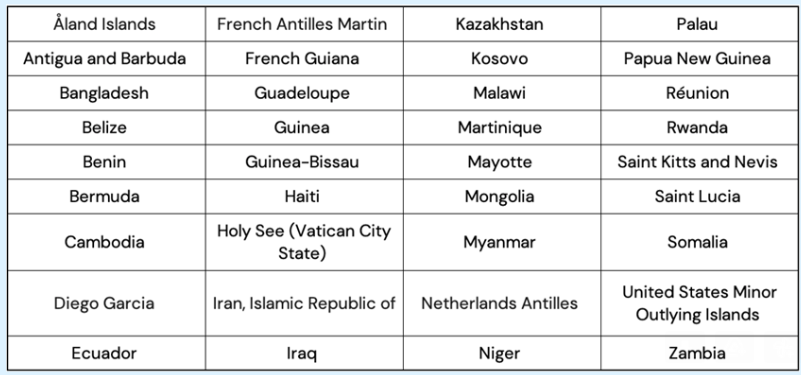
Important: As of the 14th of July 2023, SMS service will no longer be supported in the following countries and territories:
Can my SMS reminders show my business name instead of a mobile number?
No. For Australian accounts, SMS reminders and other SMS messages are sent from standard mobile numbers, not from an alphanumeric sender name such as your practice or business name.
You can include your business name in the message text by adding {BusinessName} to the SMS reminder template. This helps clients recognize the message content, but it does not change the sender shown on their phone.
Where can I see client replies to my SMS messages?
- There is a dedicated Text Messaging Panel that can be accessed through the speech bubble icon toward the top right-hand corner of any page within Zanda. When a new client reply is received, a red alert with the number of unread replies will appear on the speech bubble icon;
- In each Client Profile → Communication → Activity, there will be records of each SMS sent and received;
- It is also possible to forward client replies to appointment reminders, and other client replies to a mobile number or email address of your choice.
- Finally, the Reports → Practice → SMS Usage Report lists all text messages sent, received and forwarded to a mobile number, in a defined period of time.
Can I see whether a client has read an SMS?
No. Zanda does not show a read receipt or confirm whether the recipient opened or read the SMS. You can track the SMS activity Zanda records, including sent messages, received replies, and send status.
For account-wide tracking, go to Reports → Practice → SMS Usage. Use the date range, practitioner, and Status filters, then click Run Report. The report includes details such as the message, whether it was sent or received, the message type, the send mode, and the status.
For an individual client, open the Client Profile → Communication → Activity page. This shows the SMS messages sent from Zanda and any SMS replies recorded for that client.
What happens if I do not communicate with a client via SMS for some time?
If no outgoing SMS is sent to a client for 45+ days, then their number will be unlinked and incoming client SMS messages won’t make it to the account. Sending another outgoing message should fix this (i.e. appointment reminders, confirmations, etc.).
Why has my client stopped receiving SMS Messages from my Zanda account?
If you noticed/were notified that a client suddenly stopped receiving SMS messages from your Zanda account, there could be a few reasons for this. Read this article to learn how this can be addressed.
Can I subscribe or unsubscribe my clients from receiving SMS from my Zanda account?
In Zanda, you can communicate with clients, their contacts, referrers, and third parties via both SMS and email channels. Additionally, you can subscribe or unsubscribe recipients from receiving SMS messages directly from your Zanda account. Here is how it works:
1. Navigate to a profile > Admin > Manage page.
2. On the right-hand side, find the 'Receives SMS' setting.
3. Click the dropdown and select 'Subscribed' or 'Unsubscribed', as necessary.
4. Confirm the action.
5. Click ' Save Changes'
Can I use the Zanda SMS feature for making and receiving phone calls?
Zanda SMS feature only allows for sending and receiving text messages.
How do I know if I use the SMS feature in the most efficient way?
We have prepared a detailed article here that will help you to set up the text messaging feature to your benefit. Continue reading this article to learn more about Zanda SMS fees.
Will I be charged if an SMS was not received by a client?
Please report such instances to our support team via support@zandahealth.com for investigation. The team will communicate with the third party messaging provider to investigate the message delivery records.
In the meantime
Zanda users are charged for SMS messages once they are successfully submitted to the third party messaging provider. The submission process includes validation of phone number, message length, and format.
-
Charge Policy:
- Charges apply regardless of whether the SMS is delivered, blocked, or dropped after submission to the SMS provider.
- The SMS provider relays the message to the recipient's carrier, but the company cannot track or confirm messages blocked by the recipient's phone.
Will I be able to send SMS messages to clients with international phone numbers?
At this time, sending SMS messages to clients with international mobile phone numbers is not supported. You can only send SMS messages to numbers that correspond to the country specified in your account's business information.
❕ Please note that if you have some clients who live in a different country, we recommend to set up your Client Portal verification numbers to be sent via email. You can find this setting in User Menu > Account Settings > Schedule > Client Portal > Access and Settings.
Can I send images/photos via Zanda SMS?
Sending images or photos is not supported in Zanda SMS feature. You can send text and links (URLs).
Organisations will need to register the sender IDS with their telco provider ahead of the launch of the SMS Sender ID Register on July 1, 2026. Will Zanda register Sender IDs? How can we see what number our Zanda is using, is it the same for all of our clients?
The Australian SMS Sender ID Register applies to branded sender IDs, which are text-based sender names that appear in place of a phone number, such as "MyClinic" or "ZandaHealth." Zanda sends SMS messages from Australian accounts using standard Australian mobile numbers from a secure number pool, not branded sender IDs.
Because Australian Zanda SMS messages are sent from standard mobile numbers, there is no branded sender ID for you to register for SMS messages sent through Zanda. If your practice sends branded SMS messages through another system, check that system separately.
When you send an SMS to a client through Zanda, Zanda assigns a sending number from the secure pool for that client. The same client should continue to receive Zanda SMS messages from the same assigned number, while different clients in your account may receive messages from different numbers.
Use Reports > Practice > SMS Usage to review SMS activity, including sent and received messages, dates, recipients, statuses, and charges. The assigned Australian pool number is handled in the background rather than displayed as a report column.
What was the November 30, 2025 deadline I've seen mentioned for the Australian SMS Sender ID Register?
Related Articles
- Using the Text Messaging Panel - Learn where client SMS replies appear and how to manage them from the messaging panel.
- SMS Reminders FAQs - Review common SMS reminder questions and troubleshooting steps.
- Available Merge Fields for Communication Templates - See the merge fields available for email, SMS, and letter templates.
- Why has my Client Stopped Receiving SMS from my Account? - Check common reasons a client may stop receiving SMS messages.
- Using SMS Feature Efficiently - Learn where SMS messages can be sent from in Zanda and how to review SMS charges.
- Dedicated SMS Number Requirements (USA and Canada) - Understand dedicated SMS number requirements for accounts in supported North American and Caribbean regions.