%20-%20120%20x%2044.svg)
When you start a Zanda account, it automatically includes standard manual payment methods, such as Cash, Cheque, EFTPOS, Visa, Mastercard, and AMEX. You can add or remove payment methods to match the options your methods to match the options your practice accepts, including external terminals, PayPal, and bank transfer
In this article:
- Adding a new payment method
- Removing a payment method from the active list
- Reactivating an inactive payment method
- Frequently Asked Questions
- Related Articles
Adding a new payment method
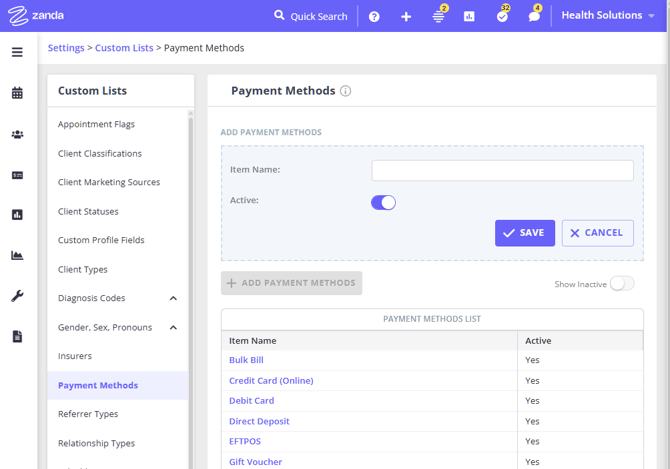
- Go to User Menu > Account Settings > Payments > Payment Methods..
- Click Add payment method.
- Add the new payment method name.
- Click Save.
To remove a payment method from the active list
-
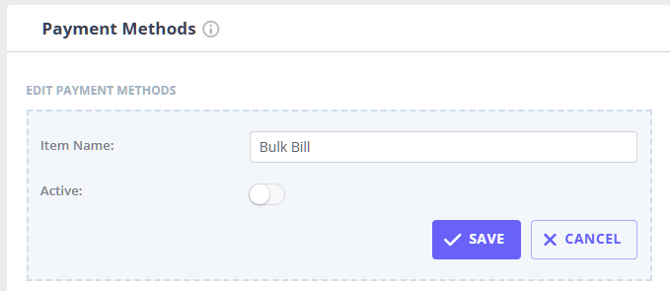
Go to User Menu > Account Settings > Payments > Payment Methods.
-
Find the payment method in the list and click on its name to edit.
-
Turn off the Active switch.
-
Click Save.
This will remove the method from the list of payment methods when you add payments to invoices.
Reactivating an inactive payment method
-
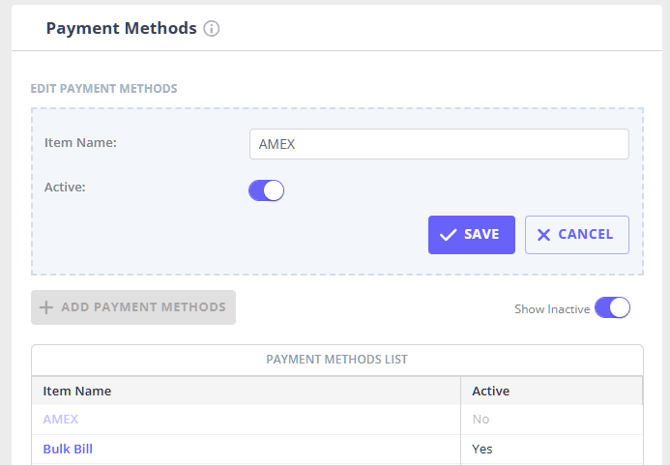
Go to User Menu > Account Settings > Payments > Payment Methods.
-
Turn on Show Inactive.
-
Find the payment method you want to make active and click its name to edit it.
-
Turn on the Active switch
-
Click Save.
This will add the method back to the list of available payment methods when you add payments to invoices.
Frequently Asked Questions
❓ Can I connect an external payment processor to Zanda?
For external processors and buy now, pay later services, such as Square, Zip Pay, Afterpay, etc, use Zanda to record the payment after it is processed outside Zanda. To offer external processors as an option, process the payment outside of Zanda, then add an active manual payment method such as Zip Pay, Afterpay, or Square in User Menu > Account Settings > Payments > Payment Methods and select it when recording the payment on the invoice. For automated online card payments and invoice payment links, connect Stripe instead — the Stripe integration processes card payments only, so record buy now, pay later payments manually using the steps above.
❓ Does any physical payment terminal other than Tyro integrate with Zanda?
No. Tyro is currently the only payment terminal that connects directly to Zanda (AUS only). Once it's set up, Tyro card payments, Medicare bulk bill claims, and private health fund claims can be processed and recorded automatically from the appointment panel.
Other terminals, including Stripe's own card terminal, Square, Zeller, and similar EFTPOS or point-of-sale devices, don't connect to Zanda directly. You can still use one of these to take an in-person card payment: process the payment on the terminal itself, then record it against the invoice in Zanda using a manual payment method, the same way described above for external processors.
If you also want to take online card payments through invoices, payment links, or the Client Portal, connect Stripe as well. Stripe is a separate integration from Tyro: it processes online, card-not-present payments only and doesn't extend to a physical terminal. See Using Stripe: Frequently Asked Questions for how it compares to a physical terminal.
❓ Can I set up ACH payments in Zanda?
ACH can be used as a payment method for recording payments in Zanda, but it is not a general direct-debit processing setup for client invoice payments. If your practice receives ACH payments outside Zanda, add ACH as a manual payment method, then select it when you record the payment on the invoice or from Billing > New Payment.
For online card payment processing, use the Stripe integration. In US insurance claiming workflows, ACH may also appear as an integrated insurance payment method when insurance claiming is active.
❓ Can I reorder payment methods so one appears first?
No. Zanda does not currently let you reorder payment methods or set one manual payment method, such as Direct Deposit, to appear first in the payment method list.
You can still manage which payment methods are available when adding payments to invoices. Go to User Menu > Account Settings > Payments > Payment Methods to add a new method, rename an existing method, make a method inactive, or turn Show Inactive on and make a method active again.
Related Articles
- Getting Started on Tyro Health (AUS only) - Connect a Tyro terminal to process card payments and health claims from the appointment panel.
- Setting up Your Stripe Integration - Connect Stripe to process online card payments through Zanda.
- Sending Links to Pay Invoices Online - Send invoice payment links by email, SMS, or automation.
- Processing Card Payments Using Stripe - Process card payments and manage Stripe payment workflows.