%20-%20120%20x%2044.svg)
When to Use BizzyAI: Write
BizzyAI: Write is Zanda’s built-in AI writing assistant designed to support clear, professional communication across your practice.
You get free access to BizzyAI: Write with your Zanda subscription.
BizzyAI: Write helps you produce professional written content in three key areas:
-
internal Practice Operations Manual policies and procedures.
Whether you’re a practitioner responding to clients daily, an admin or practice manager setting up consistent templates, or a practice owner documenting internal processes, BizzyAI: Write adapts to the context you’re working in—using client-specific information where appropriate, or operating in a privacy-safe “template mode” for generic content. Across all use cases, you stay in full control: every result is reviewable, editable, and securely processed in line with healthcare privacy and compliance standards.
- Enabling BizzyAI: Write
- Accessing the Feature
- Generating New Content
- Refining Existing Content
- Applying Changes
- Best Practices
- Compliance & Security
- FAQs
- Related Articles
How to Enable BizzyAI: Write
Accounts in a trial period will have AI features automatically enabled. Once you convert your account, you can choose to keep AI features active or disable access to them for all users in your practice.
You will need to opt-in to use AI features in you Zanda account. By default, AI features will be off in your account. Follow these steps to enable access to AI features for all users in your account:
- Navigate to User Menu > Account Settings > Practice > AI Settings
- Under the section "BizzyAI Features" toggle on "Enable AI Features". This will enable access to Write in notes as well as in the clients email and letters for all users in the account with access to those places.
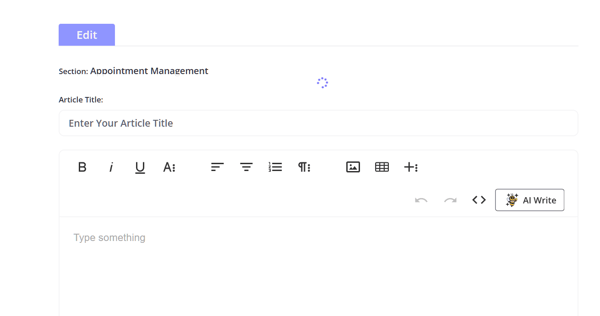
You can access BizzyAI: Write directly from the Practice Manual editor:
- Navigate to User Menu > Account Settings > Practice > Practice Manual and open a policy article in Edit mode.
- Locate the AI Write button in the editor toolbar.
💡 Note: This feature is only accessible to users with Edit permissions for the Practice Manual.
If you are starting from scratch or want to add a new section, BizzyAI: Write can generate a draft for you (Template Mode).
- Click '+ Add New Article'
- Ensure no text is selected and place your cursor where you want the new text to appear.
- Click the AI Write button in the toolbar.
- In the BizzyAI: Write modal, type your instruction into the input field.
- Example: "Write a cancellation policy for a psychology clinic that includes a 24-hour notice period."
- Press Enter or click the send icon. BizzyAI will generate a comprehensive draft based on your prompt.
You can also use BizzyAI to improve text you have already written.
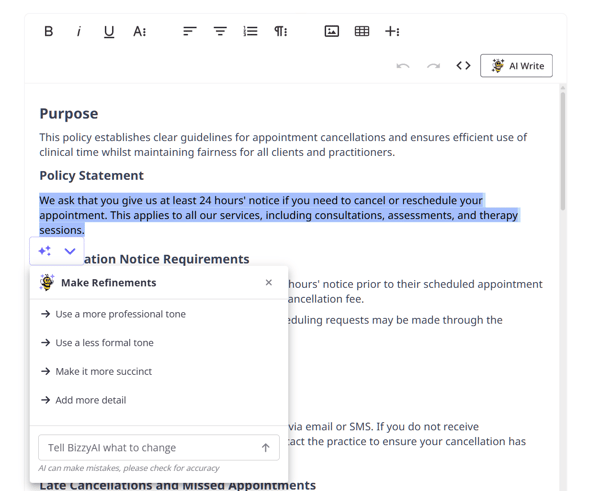
- Select the text you want to refine within the editor.
- Click the AI Write button.
- Select one of the default prompts, or enter your instruction in the modal. The selected text will be used as context.
- Examples: "Make this more friendly," "Shorten this paragraph," or "Fix grammar and spelling."
- BizzyAI will provide a revised version of your selected text.
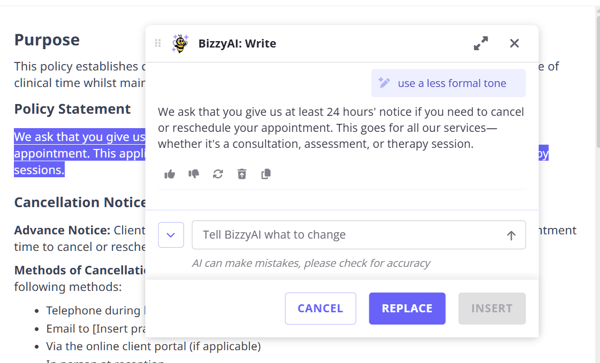
Once BizzyAI has generated a response, you can review it in the chat interface.
- You can continue the conversation to make further adjustments (e.g., "Add a section about late fees").
- You can also rate the response using the thumbs up or thumbs down icons to help improve future performance.
- If you want to start a fresh instruction without the AI considering previous context, click the broom icon to clear the conversation history.
- You can copy the text to your clipboard so you can paste it manually.
💡 Pro Tip: The chat interface maintains a history of the last 5 turns of your conversation.
When you are happy with the result:
- Replace: Updates the editor content (or your selected text) with the final AI output.
- Insert: Appends the AI output to your document at the cursor position (available when generating new content only)
- Cancel: Closes the AI window and discard the refined content
❗ Important: Verify Accuracy: Always review AI-generated content for accuracy before publishing. As the Practice Manual contains operational policies, it is essential to ensure the content aligns with your specific practice registration and local regulations.
- Be Specific: The more detail you provide in your instruction, the better the result.
- Iterate: Use the chat interface to refine the output. If the first draft isn't quite right, ask BizzyAI to adjust it.
- Provide Context: If refining a section, safeguarding that you select the relevant text helps the AI understand what you are trying to improve.
Compliance & Security Information
The BizzyAI: Write have been built with privacy and security at the forefront. Zanda adheres to strict privacy standards and the services we are using for practice policies content generation meet industry standards for security and compliance.
Learn about the extensive security and privacy measures in place that protect your data, and the steps we are taking to keep the tool accurate and reliable.
About the service we are using:
- We are using the AWS Bedrock service to access an industry leading LLM (large language model) for generating and refining the letter and email content.
- We have configured AWS Bedrock to use Anthropic's Claude.
- Data is encrypted in transit and at rest.
- No data is used to train the AI model, and all information is processed securely in real-time.
- Zanda has a zero retention agreement with AWS to ensure that no data is stored after processing.
FAQs
- Will my data be used to train the AI model?
No, our service (AWS) does not use any data input out output for training their own or any third party model providers. - How accurate is the output?
We deliver extensively fine-tuned instructions to the LLM service to control the information being returned to ensure that it is healthcare specific and based on the information provided in the prompting and basic information from the clients record that can be obtained from merge fields. The instructions have been built by practitioners in line with healthcare documentation standards. We will continue closely monitoring and fine tuning performance to ensure the model is delivering high quality and accurate output. It is recommended that the users review all output content as the user remains responsible for the documentation.
- Where is the AI generated information stored?
The generated letter and email content are double encrypted at rest in our database in a region according to your Zanda region. This information is not stored outside of Zanda secure databases. - Which server location are you interacting with for AWS?
We are using US servers for the AWS Bedrock services and in doing so we make sure your data stays safe and meets AU, EU, and UK privacy laws. We use legally binding agreements—like the EU’s Standard Contractual Clauses (SCCs) or the UK’s IDTA—to make sure your data remains protected. We follow the approved rules for each region:
- EU: We work with US companies certified under the EU-US Data Privacy Framework.
- UK: We use the UK-US Data Bridge, the UK’s version of the above.
- Australia: We follow the Australian Privacy Act and use extra safeguards (like contracts) when needed.
- Does BizzyAI: Write comply with data protection laws?
Yes, the BizzyAI: Write features are compliant with GDPR, HIPAA and other regional laws. AWS services and Zanda are designed to meet healthcare industry regulations, ensuring patient information is handled in accordance with legal and ethical standards.-
- HIPAA Compliance: Adheres to U.S. HIPAA regulations, safeguarding protected health information (PHI) with robust privacy and security measures.
- GDPR: Full compliance with EU and UK GDPR, ensuring lawful data processing, minimization, and protection of data subject rights.
- Regional Laws: Complies with other key regulations, including Australia’s Privacy Act, Canada’s PIPEDA, South Africa’s POPIA, and California’s CCPA.
- ISO 27001 Certification: This certification demonstrates that we have implemented stringent security measures to protect sensitive information and maintain data integrity.
- Business Associate Addendum (BAA): We had signed a binding BAA agreement with AWS covering all the services included in the AI functionality. We offer the same standardized BAA for customers, providing them a secure environment to process, maintain, and store PHI.
-
- Using BizzyAI: Write For Client Communications
- Using BizzyAI: Write For Communication Templates
- Enabling and Managing Your Practice Manual - Learn how to enable and manage the Practice Manual in your account.
- Using the Text Editor - A comprehensive guide to the features available in the Zanda text editor.
- Use of the Practice Manual - Understand the intended use and limitations of the Practice Manual.