%20-%20120%20x%2044.svg)
You can log in to Zanda from a desktop, laptop, tablet or mobile phone using the login page for your region.
In this article:
- Log in to Zanda
- Keep your session active
- Log out of Zanda
- Reset your email address or password
- Login says "We don't have that Username and Password combination" but your password is correct
- Frequently Asked Questions
- Related Articles
Log in to Zanda
1. Open your web browser and type in
- For the USA and Canada: https://us.zandahealth.com/Account/Login
- For the UK, Europe and South Africa: https://uk.zandahealth.com/Account/Login
- For Australia, New Zealand and other countries https://my.zandahealth.com/Account/Login
2. Type in your email address and password.
3. Click LOG IN.
That's it! You'll land on your Zanda calendar.
Keep your session active
- You will be automatically logged out after 3 hours of inactivity.
- If you select Remember me on the login page, you will be logged out after 30 days.
- Selecting Remember me keeps you logged in after you close your browser. When you type your Zanda login URL into your browser again, Zanda takes you directly into your account instead of the login page.
- Zanda user login URLs remain standard Zanda login links:
- For the USA and Canada: https://us.zandahealth.com/Account/Login
- For the UK, Europe, and South Africa: https://uk.zandahealth.com/Account/Login
- For Australia, New Zealand, and other countries: https://my.zandahealth.com/Account/Login
Log out of Zanda
It is recommended that you log out of your Zanda account when you step away from your workplace for a long period of time or finish work for the day. This ensures no one has unauthorised access to your account, and the system properly refreshes when you log in the next day.
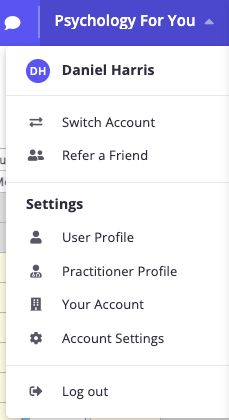
To log out,
- Select account business name at the top-right of the screen
- Select 'Log out'
Forgot your email address/password?
Learn here how to reset your email address and/or password.
❗ If there are too many incorrect login attempts, your account will be temporarily locked for 10 minutes before you can try again.
Login says "We don't have that Username and Password combination" but your password is correct
Zanda shows the message "Oops! We don't have that Username and Password combination. Please try again." for more than one reason, so seeing it does not always mean your password is wrong. If you have already reset your password, tried a private or incognito window, and cleared your browser cache without success, work through the causes below in order.
- You are on the login page for another region. Check you are using the login URL for the region your account is hosted in (see Log in to Zanda above).
- You still sign in with a username rather than an email address. Long-standing accounts may still use a username. Enter your username in the Email field. See Transition Guide for the Domain Change to ZandaHealth.com.
- Your practice account has been closed. Once the account closure date has passed, no user on the account can sign in, and the login page shows this same message rather than a separate one. Resetting your password will not restore access. See How to Store or Close Your Account.
- A subscription payment has not gone through. If a subscription invoice stays unpaid, Zanda eventually deactivates the account, and sign-in then fails with this same message. Keeping your card details current avoids this. See Updating Your Credit or Debit Card Details.
If you see a different message. "Your account has been disabled. Please contact an administrator for assistance." means your own user profile has been switched off inside an account that is still active. The master user on your practice account can switch it back on. See Managing Users.
Getting access back after your account has been closed
Email support@zandahealth.com from the email address you use to log in, so the team can identify you, and ask them to check your account status. They will tell you whether the account was closed, deactivated because of an unpaid subscription, or something else, and what your options are.
Support has to do this for you. Once the closure date passes, access is removed for everyone on the account and it cannot be reopened from your side.
Want to stop paying for a full subscription but keep your records? Storage Mode is the alternative to closing your account. For a small monthly fee your account stays available in read-only mode, so you keep access to your client records and can export them at any time. Set it up from User Menu > Your Account > Subscription Information > Close or Store Your Account (you will need to be the account's master user). See How to Store or Close Your Account.
Frequently Asked Questions:
❓ I am in Australia but Zanda opens the UK login page. Will this affect my account?
Use the login URL for the region where your account is hosted. For Australia, New Zealand, and other countries, open https://my.zandahealth.com/Account/Login. If your browser keeps opening the UK login page, update any saved bookmark or desktop shortcut so it points to the Australia, New Zealand, and other countries login URL.
You can update your account's Country, Time Zone, Time Format, and Locale in Settings > Practice > Business Info. These settings help Zanda apply the right business details and local date or time formats. Use the regional login URL for account access, and contact support if you need help checking the correct region for your account.
❓ Zanda is not loading properly on my iPad. The login page is not fully loading. How can I fix this?
A: This usually occurs when your iPad’s iOS or Safari browser needs an update. Check for and install any available software or browser updates, then restart your device and try logging in again.
Related Articles
- Resetting Your Email Address and/or Password - Reset your login details when login is blocked.
- Clearing Your Cache, Cookies and History - Clear saved browser data that may affect login.
- How to Bookmark Your Account Login Page - Save the correct regional login page for quick access.
- Transition Guide for the Domain Change to ZandaHealth.com - Review domain-change guidance for bookmarks, saved passwords, and login troubleshooting.
- How to Store or Close Your Account - Understand how account closure and Storage Mode affect sign-in access.
- Managing Users - Reactivate a user profile that has been switched off.