%20-%20120%20x%2044.svg)
Overview:
👍There are no fees for using Medicare with Zanda. It is completely free!
You will need to register your provider details with the Location (Minor) ID in your Zanda account prior to submitting claims through the system. If you have not registered, your claims will not reach Medicare.
To register for Medicare online claiming you will need to download and complete a Medicare Online Claiming Provider Agreement form (HW027).
Please note that this form cannot be completed online in HPOS to link your provider number with your Location ID at any stage, and that the online form can only be used for minor changes or to update your bank details after your Location ID has been linked using the PDF form.
You will receive an error stating your Location ID is invalid if you're trying to use the online form before linking your Location ID with the PDF form - this is because HPOS requires your Location ID to be linked via the PDF form first. This error does not indicate an issue with your Location ID and it will be accepted via the PDF form.
In this article:
- Finding Your Software Location (Minor) ID
- Completing the HW027 Form
- Frequently Asked Questions
- Related Articles
Finding Your Software Location (Minor) ID
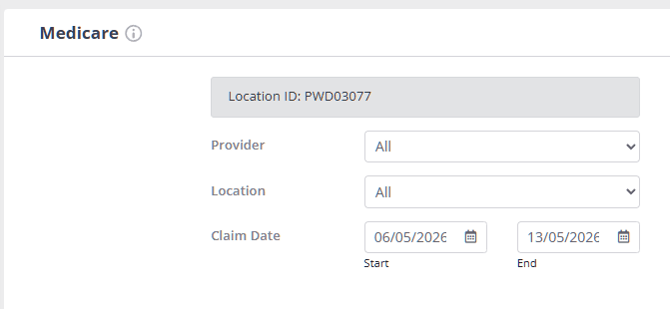
To complete the HW027 form, you need the Location ID from your Zanda account. Medicare may also refer to this as your Minor ID. In Zanda, this ID starts with PWD followed by 5 digits, for example, PWDXXXXX.
- Go to Tools > Medicare.
- If your Location ID has already been generated, it appears at the top left of the Medicare page.
- If you do not see a Location ID, click Click here to Apply to generate one. Zanda issues it instantly.
💡 Tip: Tools > Medicare is the only place the Location ID and the Click here to Apply button appear. User Menu > Account Settings > Payments > Medicare is a different page, holding your automatic payment allocation settings for Bulk Bill and DVA claims.
Zanda generates the Location ID before Medicare processes your provider paperwork. You do not need to add a practitioner provider number before generating the Location ID. If Zanda needs more account details first, it will prompt you before the Location ID is created.
Completing the HW027 Form
- When filling the HW027 form, please leave question 3 blank (relating to a PKI certificate or an RA number).
- One form per practitioner provider number needs to be completed. The HW027 form will need to be submitted to Medicare to process. Fill in the PDF form and email it to provider.forms@servicesaustralia.gov.au.
- If you are registering multiple providers at once you can use the Banking details online claiming form (HW052) which allows the registration of multiple providers bank details. You can submit the HW052 form via the online portal Health Professional Online Services (HPOS) which you will need a PRODA account to access or by simply emailing it to provider.forms@servicesaustralia.gov.au.
The processing of the form by Medicare might take several weeks. They won't send you a confirmation to let you know when it has been processed. Once you have submitted the form you will need to contact Medicare on 1800 700 199 to confirm that you can begin to submit online claims or Bulk Bills. When you speak to Medicare on that number it is important that you ask if your banking details are registered correctly for the Location ID.
For example: "This is my provider number X123456789. Are my banking details registered for the Location ID PWD000001?"
FAQ
❓ Is the Location ID the same as the Minor ID?
Yes. For Medicare claiming, the Zanda Location ID is the software Location (Minor) ID. It is attached to your Zanda account rather than to a client, child client, provider, or physical practice location.
❓ I can't see Medicare in my Tools menu. Where is it?
Medicare claiming is available on Australian accounts only, and Tools > Medicare appears only for users who have the Access Client Invoices and Payments permission. If Medicare is missing from your Tools menu, check both:
- Your account country is set to Australia. Check the Country field in User Menu > Account Settings > Practice > Business Info.
- Your user has the right permission. A Master User can check this in User Menu > Account Settings > Team > Users.
If you have just changed either of these, sign out and back in so your menu is rebuilt with the new settings. If both are correct and Medicare still does not appear, contact us at support@zandahealth.com.
❓ Why does Validate Medicare Data not validate my Location ID?
Validate Medicare Data checks the Medicare details entered on a client profile. It does not validate your Zanda Location ID. Your Location ID is generated in Tools > Medicare and is used when you register provider details with Medicare. If Medicare returns a message that the Location is not authorised, check that the Location ID shown in Zanda has been used on the Medicare registration form, confirm the practitioner's Medicare provider number, Service Type, and location are set correctly in User Menu > Account Settings > Team > Practitioners > Insurers, then follow the guidance in Troubleshooting Medicare Errors (AUS Only).
❓ Do I need to re-apply for a new Location ID if I move my business to new premises?
The Medicare Location ID Is associated with your Zanda software account, not your physical location. As such, you do not need to apply for a new location ID. However, it is still worth contacting Medicare as they may advise you to get new Provider Numbers for your new location as that is directly handled by Medicare.
❓ Our PRODA is showing our Zanda B2B device software to be inactive. I’ve generated a new code but can’t find where to activate this in Zanda / I have received an email from Services Australia that I need to go into my PRODA account and extend my B2B device.
Claiming via Zanda’s integration with Medicare doesn’t require a B2B device, so you won’t need to extend or update any B2B device settings in your PRODA account for this purpose.
Related Articles
- Preparing for Medicare Claiming (AU-Only) - Set up Medicare claiming, including insurers, provider numbers, services, and client records.
- Submitting Claims for Minors (AUS Only) - Add a parent or guardian as the claimant when submitting patient claims for a child.
- Managing Users - Check and change a user's permissions, including Access Client Invoices and Payments.
- Updating Your Business Information - Check and update your account's Country and other practice details.