%20-%20120%20x%2044.svg)
In this article:
- About short links
- Which links are shortened
- Turning short links on or off
- What your short links look like
- What your clients see
- Things to know
- Frequently Asked Questions
- Related Articles
About short links
When short links are turned on, Zanda replaces supported links in your SMS messages with a short link on a Zanda-owned domain. The client taps the short link and arrives at exactly the same page they would have reached through the long link.
Only the appearance and length of the link change. The destination stays the same, and so do that page's own access rules.
Short links apply to SMS only. Links in email keep their normal full format.
Which links are shortened
Short links apply to these merge fields when they appear in an SMS template:
| Link | Merge field |
|---|---|
| Telehealth link | {ClientTelehealthUrl} |
| Client Portal link | {ClientPortal} |
| Client Portal registrationlink | {PortalRegistrationLink} |
| Invoice payment link | {InvoicePayLink} |
| Invoice PDF link | {InvoicePDFLink} |
| Statement PDF link | {StatementPDFLink} |
| Superbill PDF link | {SuperbillPDFLink} |
| Online form link | {OnlineForm:N} |
| Incomplete forms link | {IncompleteForms} |
If a message contains a link that is not on this list, that link is sent in its original full format.
💡 You do not need to change your templates. If your SMS templates already use these merge fields, Zanda shortens them automatically once the setting is on.
Turning short links on or off
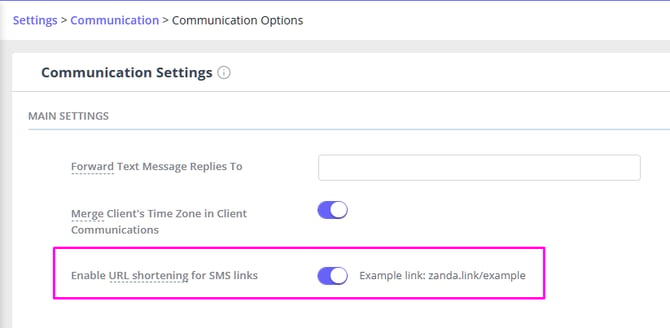
- Go to User Menu > Account Settings > Communication Options.
- In the Main Settings section, find Enable URL shortening for SMS links.
- Switch the setting on or off.
Next to the setting, Zanda shows an example of what a short link looks like for your region:
- zanda.link/example
- us.zanda.link/example
- uk.zanda.link/example
What your short links look like
Short links use a Zanda-owned domain, and the exact address depends on your regional domain:
| Regional domain | Short link |
|---|---|
| my.zandahealth.com | https://zanda.link/hGHbivY |
| us.zandahealth.com | https://us.zanda.link/hGHbivY |
| uk.zandahealth.com | https://uk.zanda.link/hGHbivY |
The characters after the domain are unique to each link.
What your clients see
Clients receive a short link in place of the long system-generated address. When they tap it, they are redirected to the correct Zanda page.
The destination page behaves exactly as it always has. If it requires a login, or has its own expiry rules, those still apply.

Things to know
- Short links change how the link looks, not where it goes.
- Links shared via email are not affected.
- Shortening is best-effort. If a link cannot be shortened for any reason, Zanda sends the original full link so your message still goes out with a working address.
- Links can still expire based on the rules of the destination page, such as a portal registration link that lasts 7 days.
Frequently Asked Questions
❓ Does this shorten links in email messages?
No. Short links apply to SMS only. Email links keep their normal full format.
❓ Will my clients still reach the same page?
Yes. The short link redirects to the same destination the long link would have opened.
❓ Do I need to update my templates?
No. If your SMS templates already use the supported merge fields, Zanda shortens those links automatically once the setting is on.
❓ What happens if a link cannot be shortened?
Zanda uses the original full link instead, so the message is still delivered with a working address.
❓ Can clients trust the short link?
Yes. Short links use a Zanda-owned domain rather than a third-party shortening service.
❓ Why is one link in my message short and another one long?
Only the merge fields listed in Which links are shortened above are supported. Any other link in the message, including one you typed in yourself, is sent exactly as written.
Related Articles
- Available Merge Fields for Communication Templates - The full list of merge fields you can use in SMS and email templates.
- Creating and Managing Communication Templates - Build and edit the SMS templates these links appear in.
- About SMS Messages and Fees - How SMS length affects the cost of a message.