%20-%20120%20x%2044.svg)
The Preview Attachments feature allows you to preview attachments directly from the email window without needing to download them first. It works for system-generated documents (like invoices) and files that are already uploaded to Zanda.
You can use this when emailing from any profile type, including:
- Client Profiles
- Contact Profiles
- Shared Profiles
- Referrer Profiles
- Third-Party Profiles
💡 Important: This feature does not support previewing files selected directly from your computer while writing an email. To preview a custom file, you must upload it to a Profile first.
In this article:
When you are sending an email with an attachment (such as an invoice, letter, or uploaded file), you can now simply click the attachment link to preview it.
- Start by creating an email for the item you want to send (e.g. click Email Invoice, Email Letter, or Email File).
- Find the Attachment section in the email window.
- Click on the name of the attachment link.
- A preview window will appear showing the document.
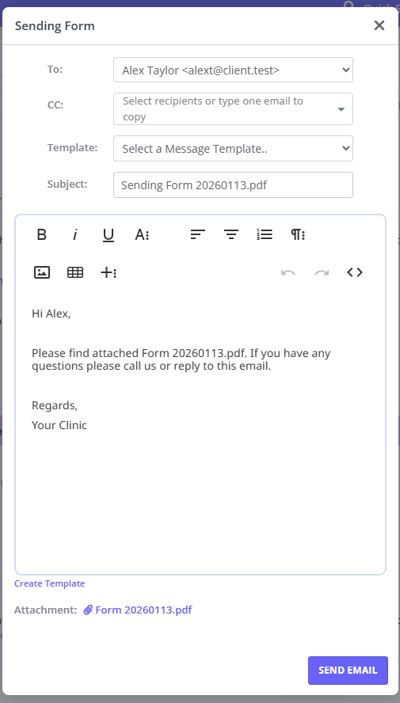
You can preview both system-generated and custom attachments.
- Invoices: Fully supported.
- Statements and superbills: Fully supported.
- Letters: Supported.
- Notes: Supported.
- Forms: Supported.
- Profile Files: Any file uploaded to a Profile > Files section (e.g., PDFs, Images, Word Docs) can be previewed. This applies to Client, Contact, Referrer, Shared, and Third-Party profiles.
The previewer supports various file types. How they are displayed depends on the format:
| File Type | Preview Method |
|---|---|
| Displayed in an embedded viewer. | |
| Images (jpg, png) | Displayed directly. |
| Audio / Video / Text | The preview modal attempts to show them. If the browser cannot embed them, it may trigger a download. |
- Sending Invoices and Receipts to Your Payees - Learn how to email invoices.
- Creating Statements Billed to Clients - How to generate and manage statements.
- Creating Statements Billed to Third Parties - Creating statements for third parties.
- Creating Superbills - Creating superbills for insurance claims (US-only)
- Sending Letters to Referrers - Emailing letters to referrers.
- Upload Files or Documents - Uploading and managing client files.
- Creating and Managing Session Notes - Emailing session notes.
- Sending Online Forms to Clients - Emailing online forms.