%20-%20120%20x%2044.svg)
Modifiers are additional codes used to provide extra information about a medical service or procedure. In the United States, these are essential for accurate insurance billing (CPT Modifiers) to modify the description of an item without changing its core definition.
💡 Note: Modifiers in Zanda are primarily designed for US insurance claiming workflows (including CMS-1500 forms).
In this article:
- What are Claiming Code Modifiers?
- Adding Modifiers to Services and Products (Setup)
- Adding Modifiers to Invoices
- Setting Default Modifiers for Practitioners
- Modifiers on US Claim FormsRelated Articles
- Frequently Asked Questions
- Related Articles
Modifiers are alphanumeric codes (up to 2 characters each) that you can attach to individual items on an Invoice or Item. They help clarify the context of the service or product provided to payers.
In Zanda, you can add up to four (4) distinct modifiers per service or product item.
You can configure default modifiers for specific services or products so they automatically appear whenever you invoice that item.
- Go to User Menu > Account Settings > Billing.
- Click on a Service or Product to edit it (or create a new one).
- Locate the "Claiming Code Modifiers" section.
- Enter your default modifier codes (e.g.,
25,GP) into the available fields. - Click Save.
You can add or edit modifiers directly on an invoice for a specific client visit.
- Create a new invoice or edit an existing one.
- In the invoice items grid, look for the "Modifiers" column.
- Enter or update the modifiers for each line item as needed.
- Click Save Invoice.
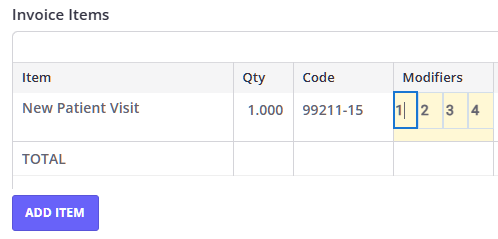
If a specific practitioner always requires certain modifiers for their services, you can set defaults at the practitioner level.
- Go to User Menu > Account Settings > Team > Practitioners.
- Select the practitioner's profile.
- Go to the Details tab.
- Find the "Claiming Code Modifiers" section.
- Enter the default codes.
- Click Save.
When you generate an insurance claim using Zanda and Ensora integration or create a CMS-1500 Claim Form from an invoice, the modifiers you entered will automatically populate in Box 24d, alongside the CPT/HCPCS code.
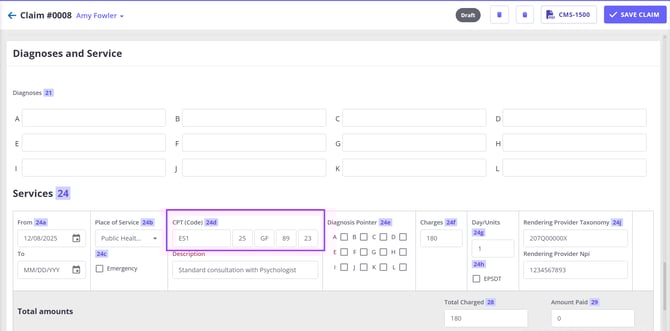
This ensures your claims are compliant and contain all necessary clinical context for reimbursement.
❓ Do modifiers appear on the client's invoice PDF?
No, currently modifiers are only visible on the screen within Zanda and on the US Claim Form (CMS-1500). They are not included on the standard printable invoice PDF.
❓ How many modifiers can I add?
You can add up to 4 modifiers per line item. Each modifier can be up to 2 alphanumeric characters long.
- Adding and Editing Services - Learn how to set up your service codes
- Adding and Editing Products - Learn how to set up your product codes
- Preparing for Claiming (US Only) - General guide for US insurance claims
- Creating, Editing, Printing and Emailing Invoices - How to generate and manage invoices